Key licensing definitions for Strapi Enterprise Edition
Last updated: February 19, 2026
Definition of "Admin User"
Admin users are individuals who log in to and access the Strapi admin panel (the back-end interface used to manage content and configure the application).
Important
End Users are entries within the Users & Permissions plugin content type. They interact with your project through the Strapi API (e.g. via your front-end application), not through the admin panel itself.
Definition of "Environment"
An "Environment" is a system or workspace with a collection of hardware, software tools, and processes used for a specific purpose such as:
Development
Staging
Testing
Deployment
Production
Backup
UAT (user acceptance testing)
Definition of "Seat"
A "Seat" is a registered account on the Strapi software that:
Can be occupied by a single admin user at any given time
Exists on a specific instance of the software
Applies to a specific environment
How seat licensing works
To determine compliance with your maximum seat count:
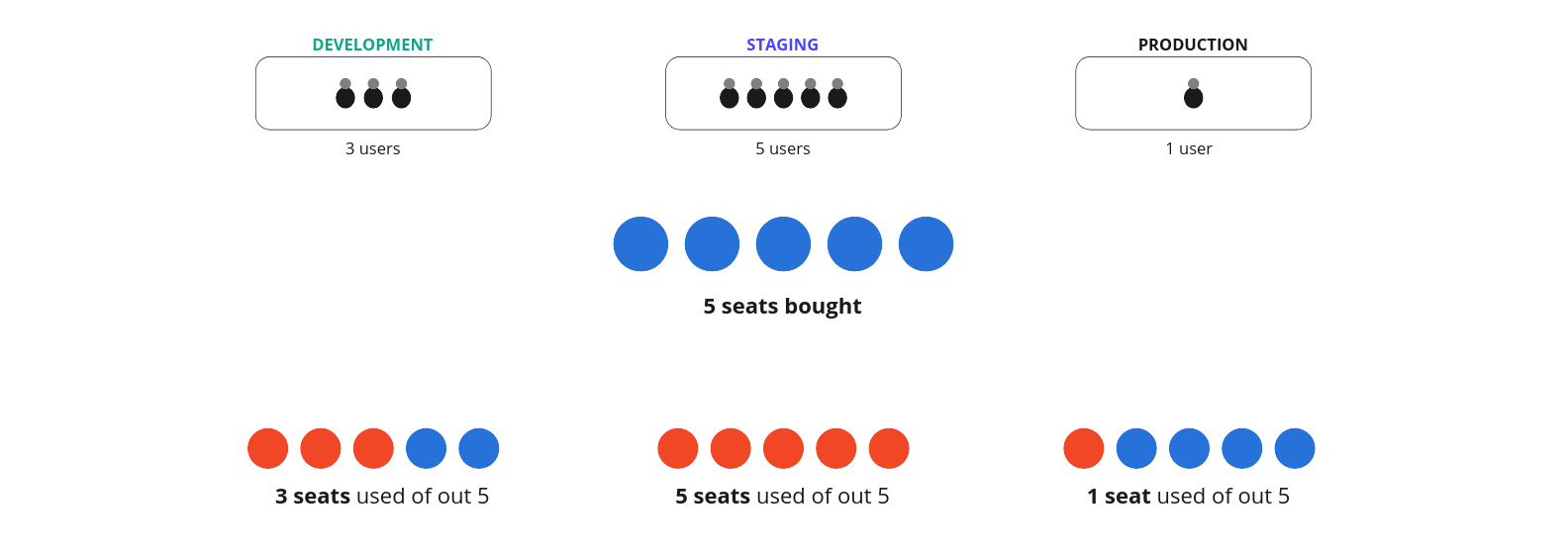
The number of seats per project equals the number of seats purchased
This corresponds to the total admin users able to access any single environment
User-to-seat relationship
One unique admin user per seat in an environment
An admin user may occupy multiple seats across different environments
Example scenarios:
An admin user may have one seat in development and another in staging
If you purchased 10 seats for 1 project deployed across 3 environments, you could have up to 30 users (maximum 10 unique users per environment)
When an admin user's access is terminated, their seat becomes available for another user
For more details about Enterprise licensing, contact our sales team.